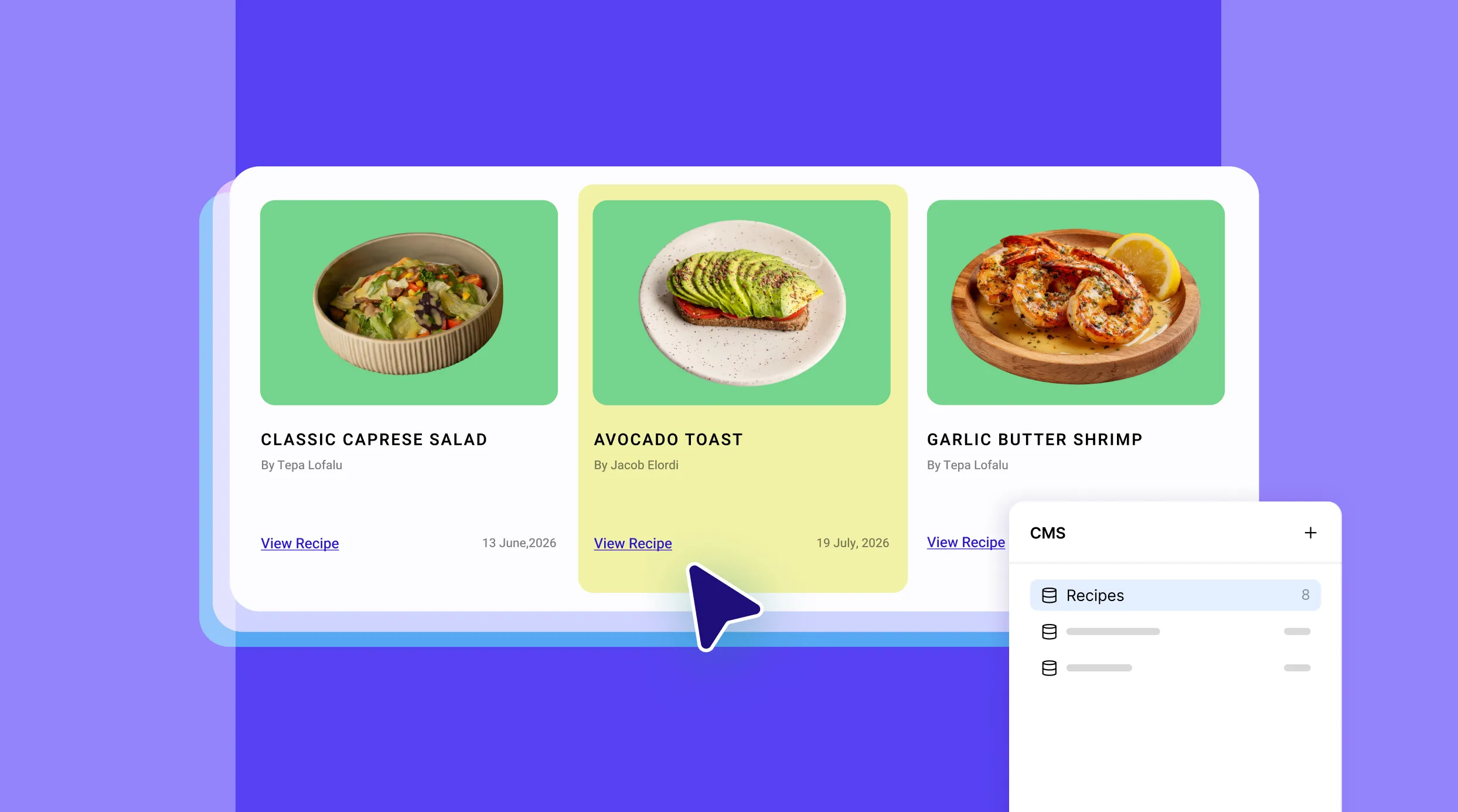
Do you wish to start an online recipe blog but don’t know how to code? And maybe you’d rather skip the hassle and cost of hiring experts?
Well, you’re in luck, today we’re unpacking everything you need to know about how to create a recipe website that’s both dynamic and SEO-optimized, without writing a single line of code!
Step 1: Choosing The Right No-Code Platform
The first step in creating a dynamic recipe website is finding a no-code platform that supports a Dynamic Content Manager. But what else should you look for? Here are a few key features to consider:
Dynamic Content Manager: You’ll need a Content Manager that lets you store, organize, and display content for any purpose and update it anytime as your site grows.
Dynamic SEO Capabilities: Make sure the platform supports dynamic SEO features to improve your site’s visibility in search engines.
Granular Level Customizability: For a standout recipe website, you’ll need granular control and extensive customization options to make it truly unique and engaging.
Built-in One-Stop Solution: A comprehensive, all-in-one solution is key to ensuring optimal website performance cost-effectively.
Looking at these specs, only one name comes to mind: Kirki, the no-code website builder for WordPress that has its own dynamic content!
Step 2: Create a Recipe Collection
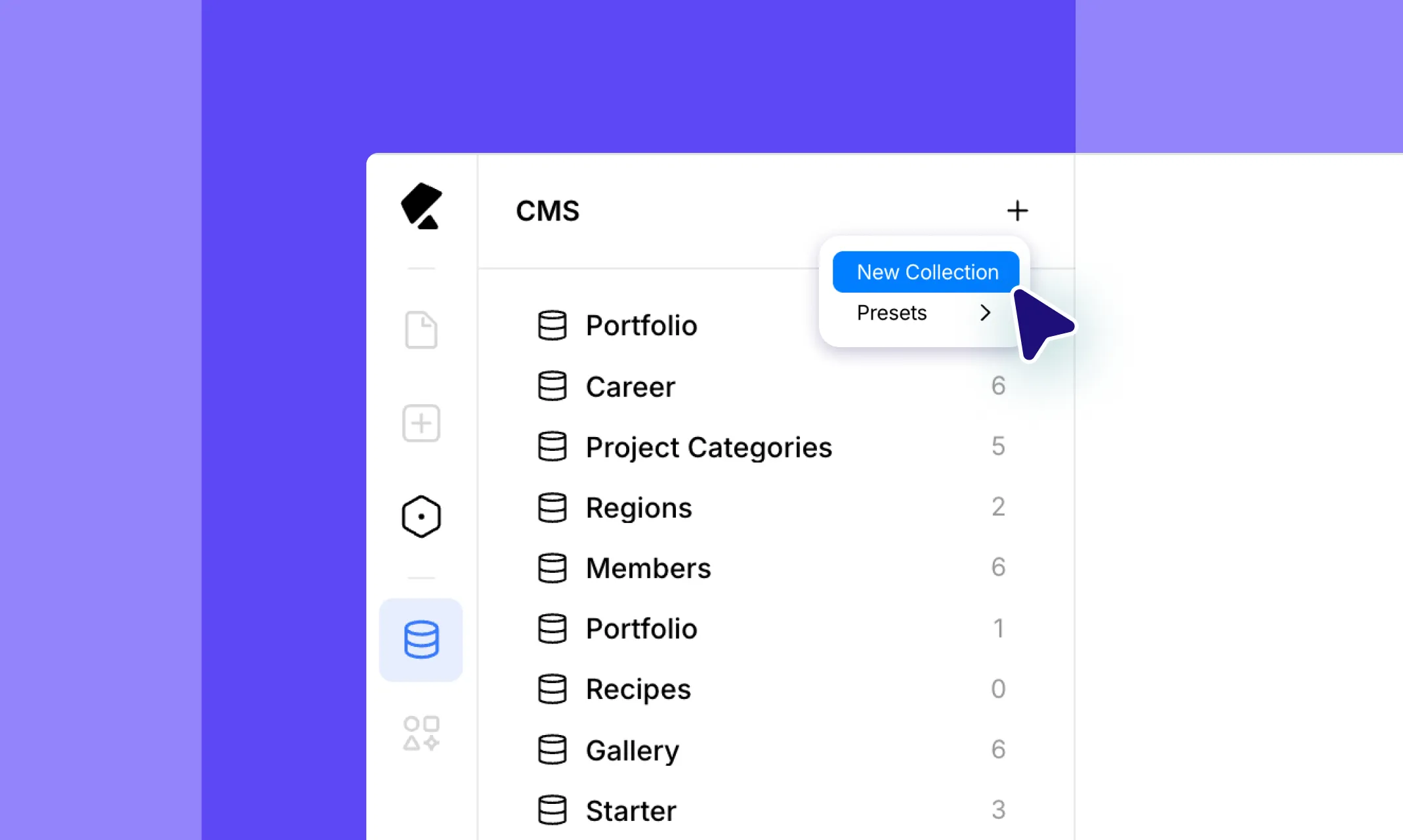
Once you’ve chosen your platform, the next step is setting up the Content Manager to store your recipes.
Open the Dynamic Content panel from the left sidebar in Kirki. Click the “+” button at the top, a dropdown will appear with two options: New Collection and Presets.
To start from scratch, select New Collection. A modal will appear where you can enter your Collection Name and URL. You’ll see Basic Fields (Name and Slug) already included by default.
To add recipe-specific fields like ingredients, cooking time, instructions, image, category, and difficulty level, click the “+” next to Custom Fields and build them out one by one.
Alternatively, select Presets to get a head start with a ready-made recipe structure; you still have full freedom to customize it just like any other collection.
Once you’re happy with your fields, click Create Collection.
Step 3: Add Recipes as Collection Items
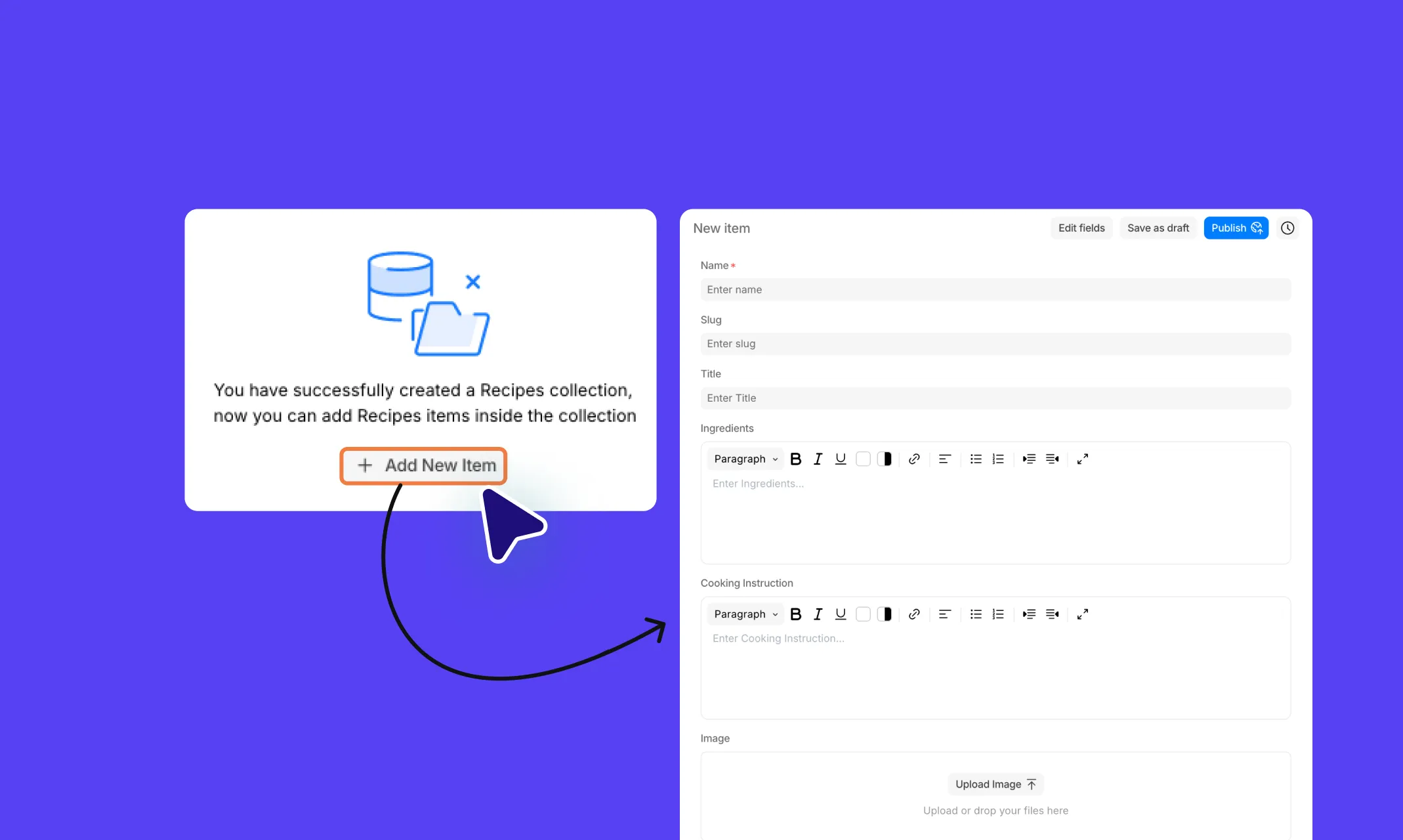
After creating your recipe collection, select it from the left panel of the Dynamic Content section. Your collection will open, and you’ll see a “+” button to add a new item.
A New Item panel will slide open on the right, showing all your fields: Name, Slug, Title, Ingredients, Cooking Instruction, Image, Preparation Time, Thumbnail Image, and any other custom fields you created.
Fill in all the fields with your recipe content. Once done, either click Save as draft to save for later or hit Publish to make it live. Repeat for each recipe you want to add!
Step 4: Dynamically Display Recipe Lists
Now it’s time to display all your recipes dynamically on a listing page.
In Kirki, open the Insert panel from the left sidebar and navigate to Contents > Collections. You’ll see all your available collections listed — select Recipes to add a Collection element to your canvas.
Once placed, you’ll see your collection structure in the Layers panel as Recipes Collection > Items > Item with child elements like Heading, and Paragraph nested inside. Add elements here as needed to design your collection list.
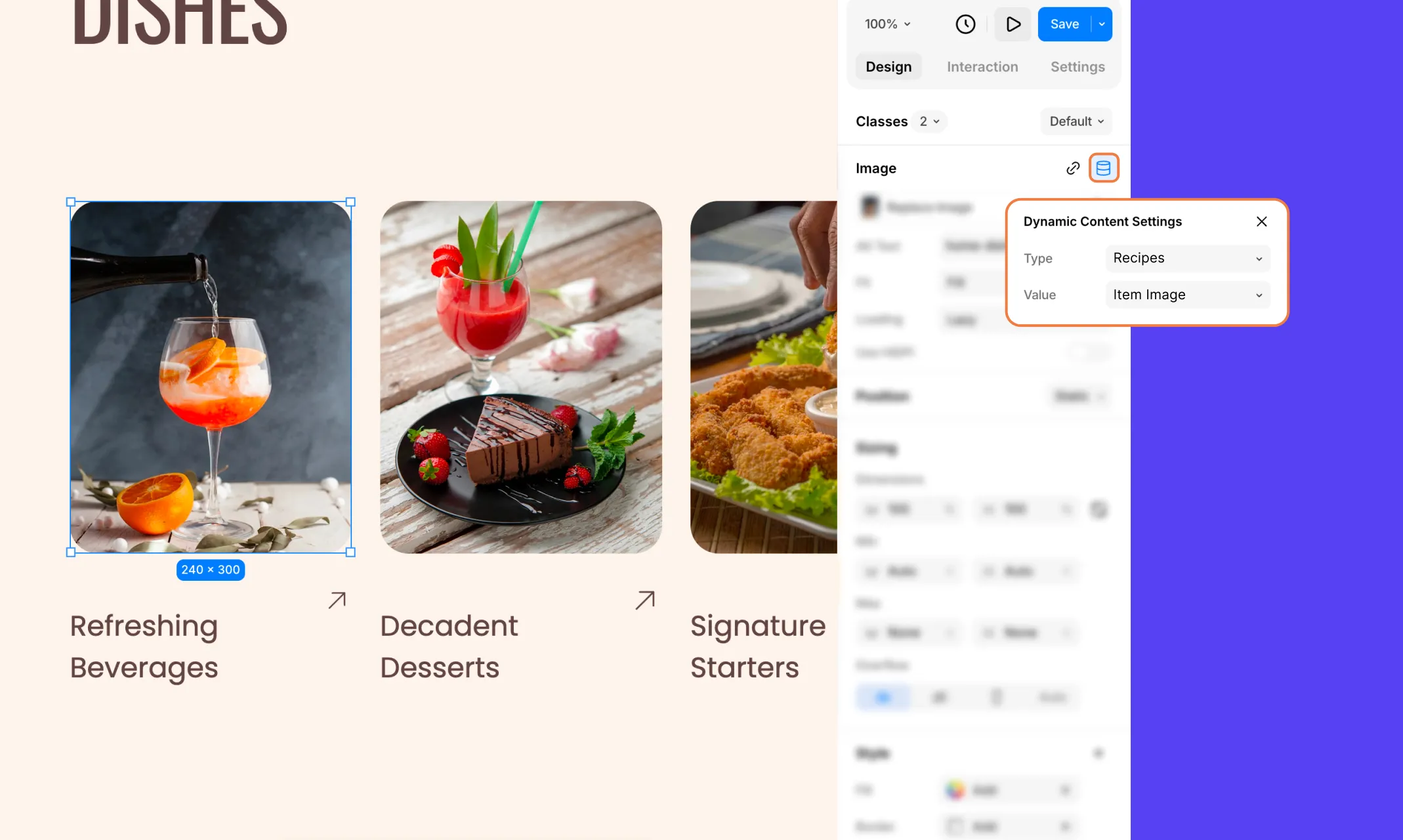
To connect each element to your collection data, select it on the canvas, then click the Dynamic Content icon in the Design tab next to the element’s name. The Dynamic Content Settings popup will appear. Set the Type to your collection (e.g. Recipes) and the Value to the relevant field (e.g. Item Image, Item Title, etc.).
Once all elements are mapped, your listing page will dynamically pull and display all your recipes automatically. You can also configure filter, sort, and pagination options directly from the collection settings to control how recipes are displayed.
Step 5: Design Your Recipe Template Pages Dynamically
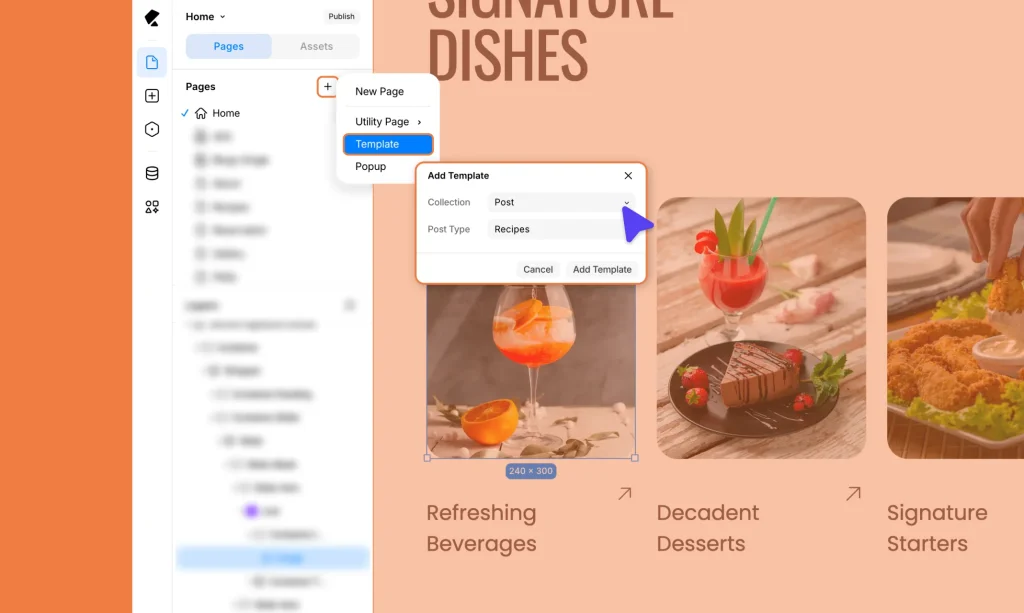
Your dynamic website also needs individual detail pages for each recipe. Here’s how to create them in Kirki:
In the Pages panel, click the “+” to add a new page.
From the dropdown, select Template > an Add Template modal will appear. Set Collection to Post and Post Type to Recipes, then click Add Template.
This creates a single template page that will serve as the detail page for every recipe in your collection.
Design the page layout however you like. Then, for each element, open Dynamic Content Settings and set the Type to Recipes and the Value to the relevant field — just like you did on the listing page.
Kirki will automatically generate a unique, fully populated detail page for every recipe in your collection!
Step 6: Set Up Dynamic SEO Using Field Tags
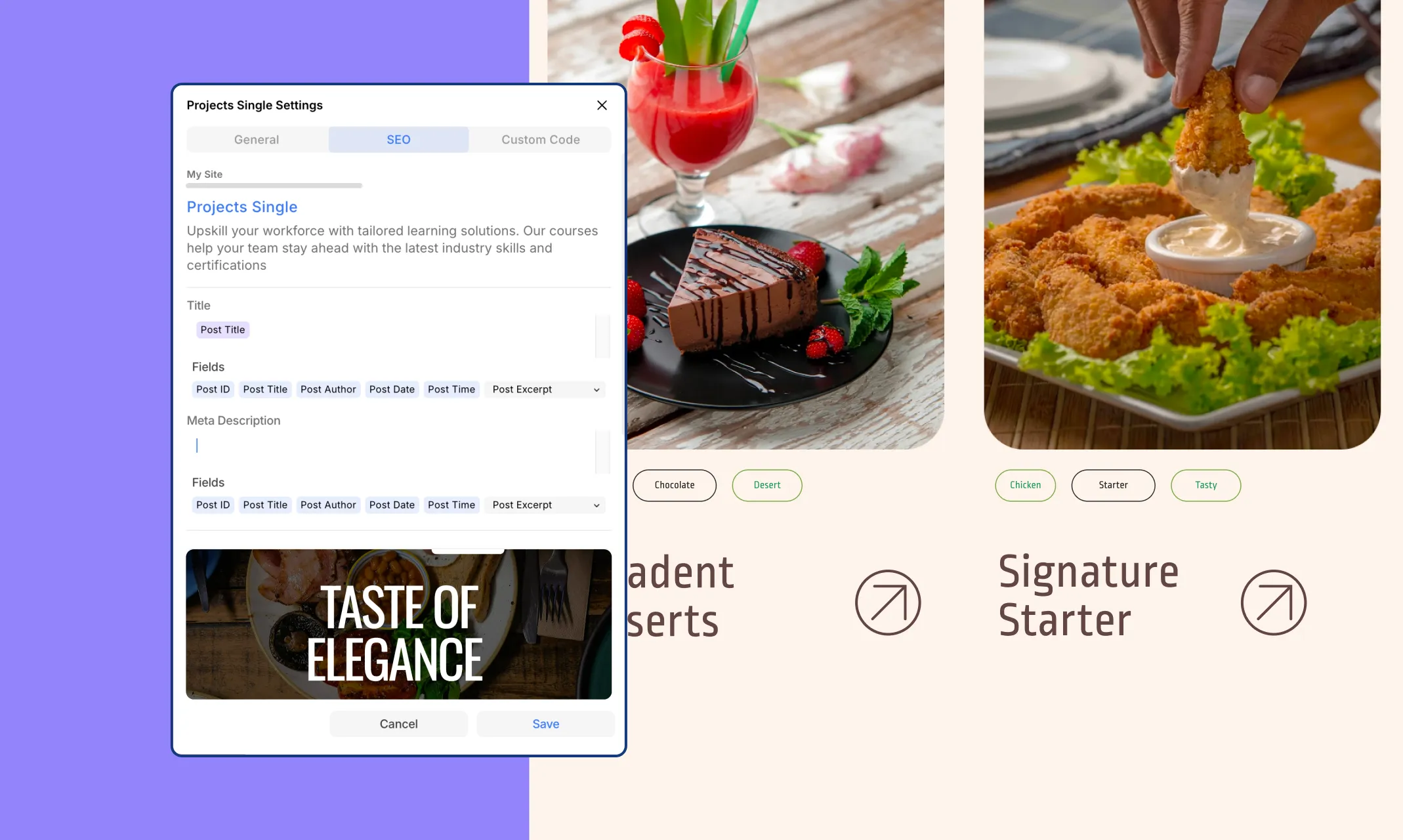
Last but not least, SEO-optimize your recipe template so each recipe page ranks on its own.
Right-click your template page in the Pages panel and open Page Settings.
Navigate to the SEO tab. Here you’ll find the Title and Meta Description fields.
For parts of the title or description that should be recipe-specific, click the relevant field tags — Post Title, Post Date, Post Author, and more to insert them dynamically.
This way, each recipe page automatically gets its own unique, optimized SEO title and description without any manual work.
Why Make Your Recipe Website Dynamic?
Now you know how to create a recipe website dynamically — but why build it this way? Here’s why using Kirki’s Dynamic Content Manager makes all the difference:
Accelerated Design: Edit your recipe structure once and update it everywhere instantly, saving enormous amounts of time.
Effortless Scalability: Your website grows seamlessly alongside your content — no rebuilding required.
Streamlined Collaboration: Separate content management from design, making it easy for different team members to work independently.
Enhanced Flexibility: Structure your content to your exact needs and update it anytime with just a few clicks.
Launch Your Recipe Website Today
Experience simplicity and scalability like no other when building your recipe website with Kirki’s Dynamic Content Manager!
Effortlessly create collections, add content, and display it dynamically — all from within Kirki, the freeform infinite canvas WordPress website builder.
So why wait? Get Kirki today and launch your recipe website!

