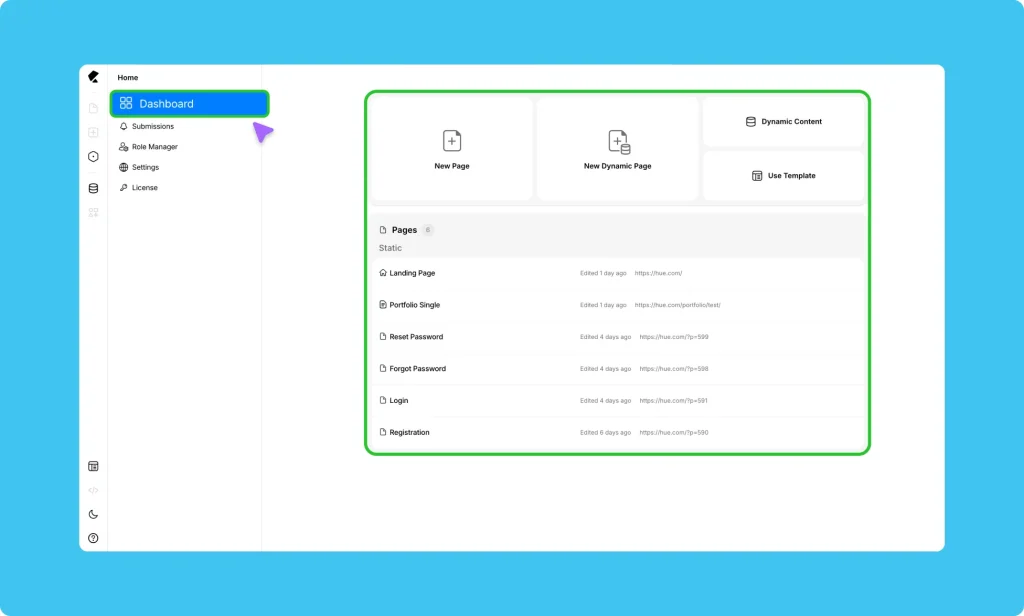
The Kirki Dashboard is your home base – the first thing you see when you open Kirki and the place you return to whenever you need to manage your site outside the editor.
Quick Actions
At the top of the dashboard, you’ll find shortcuts to the most common starting points:
- New Page – Create a blank static Page and open it directly in the Kirki editor.
- New Dynamic Page – Create a page powered by a dynamic content collection, ideal for blogs, portfolios, directories, and other data-driven layouts.
- Dynamic Content – Jump straight to the Dynamic Content Manager to create or manage your custom content collections.
- Use Template – Browse the Kirki Template Library and launch a complete site design in seconds.
Pages
Below the quick actions, you’ll find a live list of all your pages organized by type: Static and Dynamic.
Each entry shows the page name and when it was last edited, so you always know where you left off. Click any page to open it in the editor.
Dashboard Navigation
The left sidebar gives you access to everything outside the editor:
- Dashboard – Returns to this overview
- Submissions – View and manage form submissions
- Settings – Configure global site settings
- Role Manager – Control what different user roles can access and edit
- License – Manage your Kirki Pro license